


Whether you’re a startup, one of many sole traders, or an established company, your business website is often the first place potential customers go to decide whether they trust you. And that decision is made quickly.
The reality is that most small business websites do not perform.
They exist, they may even look decent, but they do not generate enquiries, they do not support SEO properly, and they do not help the business grow in any meaningful way.
This guide is designed to change that.
We’re going to break down what actually makes small business website design work, from structure and user experience through to copywriting, SEO, conversions, cost, and platform choice.
More importantly, we’re going to look at it from a commercial point of view, not just a visual one.
Because a successful website is not just something that looks good.
It needs to work hard for your business.
Table of Contents
Why Small Business Website Design Matters More Than Ever
Your website is often your real first impression
For most small businesses, your website is your digital storefront. Before someone picks up the phone, sends an email, or submits a form, they have already judged your business based on what they see online.
That judgement happens really fast.
Users form impressions in a fraction of a second. Whether the exact number is 0.05 seconds or a little longer, the point is the same: people decide fast.
Even more importantly, studies by Stanford University found that 75% of consumers judge a company’s credibility based solely on its website design.
A dated, slow, or confusing business website immediately creates doubt.
A modern, well-structured, professional-looking site does the opposite: it helps visitors feel more confident that your business is credible, established, and worth contacting.
That is exactly why good web design is not just about appearance, it is about shaping trust before a conversation even begins.
You might know that your service is excellent, that your team is reliable, and that your work is strong. But if your website does not communicate that quickly, people will never give you the chance to prove it.
Customer behaviour has changed
Customers no longer move from search to buy in a neat, simple line.
They search, compare, browse, check your reviews, look at your social media, visit your competitors, and then come back again.
This is the messy middle, the stage where people are exploring and evaluating before they decide.
Your website sits at the centre of that behaviour.
It is the place people return to when they want reassurance. It is where they compare your credibility against competitors. It is often the place where they decide whether your business feels trustworthy enough to contact.
This is why small business website design is no longer just about having something online.
Your website needs to support the way people actually make decisions today.
AI search is changing how people discover businesses
Search is evolving quickly.
People are no longer just typing short phrases into Google.
They are asking full questions, using voice search, and relying more on AI tools like ChatGPT and Google’s AI-generated results to summarise information for them.
That changes what a good website needs to do.
If your site is poorly structured, vague, or lacks clear answers,
AI tools are less likely to surface it. If your pages are clear, organised, and genuinely useful, you improve your chances of appearing in traditional search results and in AI-driven summaries.
That means modern small business web design now has to work for users, search engines, and increasingly, AI systems interpreting your content on the user’s behalf.
A shallow brochure website will struggle in that environment. A clear, useful, well-structured one stands a much better chance.
What Is Small Business Website Design, Really?
It is not just visual design
One of the biggest misunderstandings about website design is thinking it is mainly about appearance.
It is not.
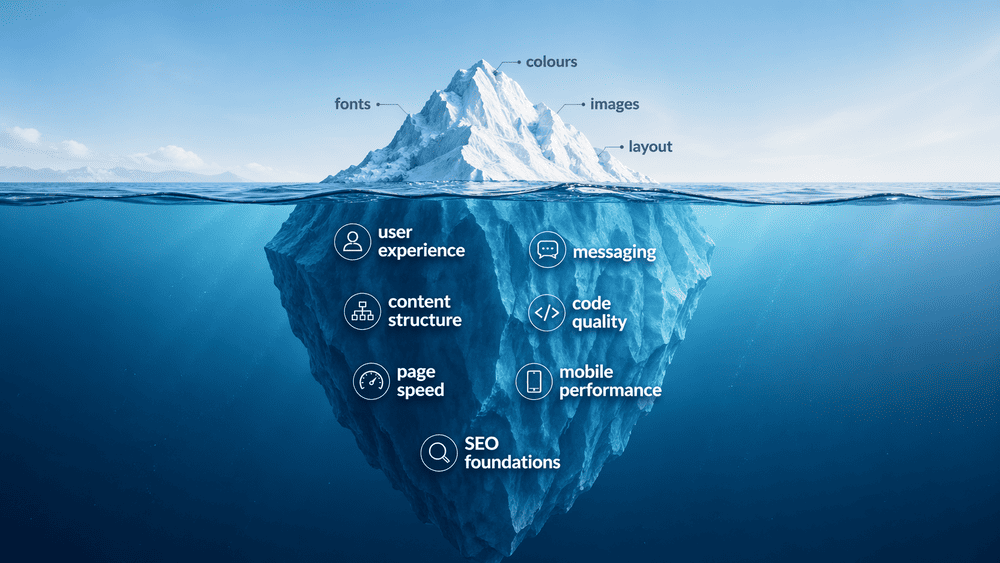
A useful way to think about it is the iceberg analogy.
The visual design is the part above the water, including colours, fonts, images, and layout. It is what people notice first. But underneath that is the much bigger part that actually determines whether the website works:
- User experience
- Messaging
- Content structure
- Code quality
- Page speed
- Mobile performance
- SEO foundations
This is why a site can look polished and still perform poorly.
If the structure is weak, the content is vague, the pages are slow, or the site does not guide people properly, it will underperform no matter how nice it looks.
The difference between a website that exists and one that performs
A website that merely exists is easy to spot.
It sits online, it lists a few services, maybe it has a contact page, but it does not rank, it does not generate traffic, and it does not produce consistent enquiries.
A website that performs does something very different.
It ranks for relevant searches, keeps people engaged, builds trust quickly, and generates real enquiries over time.
Damien Buxton – Director at Midas Creative, puts it clearly:
“Most small business websites fail for one simple reason. They are built to exist, not to perform. A website should generate enquiries, build trust, and support growth. If it does not do that, it is not working.”
That distinction matters. Because if your website is a key part of your marketing, it should be judged by business results, not just by how it looks.
What Makes a Good Small Business Website?
Clear messaging and positioning
A good small business website should make your offer obvious within seconds.
Visitors should be able to answer three simple questions immediately:
- What do you do?
- Who do you help?
- What should I do next?
If your website cannot answer those quickly, it creates friction.
One of the most effective tests for this is the 5-second test.
Open your homepage, look at it for five seconds, then ask yourself whether a new visitor would understand what your business does and who it is for.
If the answer is no, the messaging is not clear enough.
Strong messaging is not about sounding clever. It is about making your value obvious.
Strong user experience
User experience is one of the most important parts of web design, and one of the most misunderstood.
A user-friendly website should feel effortless. People should be able to move through it naturally, find what they need quickly, and take the next step without confusion.
In UX terms, this is closely related to usability, which focuses on how easy interfaces are to use and how efficiently users can complete tasks.
That means:
- Simple navigation
- Sensible page flow
- Clear page titles
- Readable layouts
- Obvious calls to action
Paul Skelton, Director at Midas Creative, explains it well:
“If users have to think too much, the design is not working. The best websites feel effortless.”
Good user experience is not flashy. It is functional. It removes friction.
Fast, secure, and technically sound foundations
A small business website that is slow, insecure, or unreliable will struggle no matter how good the design is.
Site speed matters because users are impatient. If pages take too long to load, people leave.
Security matters because users need to feel safe, and search engines increasingly factor technical quality into rankings.
That means your website should be:
- Quick to load
- Mobile responsive
- Secure with HTTPS
- Built on reliable hosting
- Maintained properly over time
These things are often invisible when done correctly, but they have a massive impact on performance.
Design that reflects your brand without getting in the way
Good design should support your brand, not compete with your message.
A visually appealing website matters, but not at the expense of clarity.
Some businesses become so focused on looking different that they create something hard to use or hard to understand.
The best design is the kind that feels aligned, professional, and distinctive, but still puts communication first.
Real authenticity: why ditching stock photography matters
One of the easiest ways to make a small business website feel generic is to fill it with stock photography that has no connection to the business.
You’ve seen the images:
- Handshakes
- Smiling people pointing at screens
- Fake office scenes
- Polished corporate shots that look nothing like the actual business
These rarely build trust.
Real, even slightly imperfect, photos of your team, premises, or work are almost always better.
They create authenticity, make the business feel more human, and help potential customers feel like they are dealing with a real company rather than a template.


The above is a great example of this in practice.
Both images depict a client meeting. The left image is a real image of the client (Atomic Consultancy) and the customer and the right is a generic stock image.
Damien goes on to say:
“This example makes it really easy to see and feel the difference. On one hand you have authetic images that build trust and tell a story and on the other, it’s cold and not very inviting. Ask yourself, which would you likely be drawn towards?”
Accessibility and compliance for UK businesses
A good website should also be usable by as many people as possible.
That means thinking about:
- Readable text
- Sensible colour contrast
- Clear navigation
- Accessible forms
- Mobile usability
On top of that, UK businesses need to consider basics such as GDPR, privacy policies, and cookie consent where appropriate.
These are not the most exciting parts of web design, but they matter. They support trust, reduce risk, and demonstrate professionalism.
What Pages Should Every Small Business Website Include?
Your homepage: your first and most important impression
Your homepage is not your whole website. But it is your most important page.
Its role is not to explain every service in exhaustive detail. Its job is to orient the user quickly, build trust, and direct them to the right place.
A high-performing homepage usually includes:
- Hero section: a clear headline and primary call to action
- Social proof: reviews, testimonials, or logos to build trust quickly
- Core services: a simple overview with links to detailed service pages
- About/trust section: a short summary of who you are and why people choose you
- Final call to action: another clear next step lower down the page
The homepage should act as a hub, not an everything page.
Paul puts it perfectly:
“Think of your homepage as a contents page in a book. It’s there show what that the book contains or in this case what the website, it’s all about and what it includes. Key elements about you business and services should be there. People can skim it quickly and see the main parts that they want.”
Service pages: the foundation of SEO and enquiries
If the homepage is the hub, the service pages are where the real work happens.
Each service you offer should have its own dedicated page.
That allows you to target specific search terms, tailor the messaging to that service, and improve the likelihood of converting users who are searching for something very specific.
Trying to cram all services onto one page is one of the most common small business SEO mistakes. It weakens clarity and usually damages rankings.
A strong service page should include:
- A clear service headline
- Who the service is for
- Benefits, not just features
- Trust signals
- A clear CTA
A good example of this would be a company that offers multiple services; in this case, we will use a beautician to illustrate this. Let’s say they offer eyelash extensions, waxing and facials. A potential customer who wants leg waxing possibly would have no interest in having a facial. Likewise, someone wanting a facial may not want to read about eyelash extensions. Each service should have its own page.
“Not only does it help the customer being able to navigate easily to what they are interested in, it also allow allows for each specific page to better optimised for search engines. With the right text and structure and if done well it will help search engines understand what is on offer in a clear way and hopefully improve the chance the page has to rank well” – says Damien.
About page: where trust is built
Many small businesses treat the About page as an afterthought, but users often visit it early in the decision-making process.
That is because they want to know who they are dealing with, what makes you different, and whether they can trust you.
A strong About page should not read like a dry corporate history. It should focus on:
- Why the business exists
- Who you help
- Your experience
- Your approach
- The human side of the business
Paul explains:
“People don’t just buy services, they buy confidence. The About page is often where that confidence is built.”
Contact page: removing friction and supporting local SEO
A contact page should make it as easy as possible for someone to get in touch.
At a minimum, it should include:
- A simple contact form
- Clickable phone number
- Email address – Although a contact form helps stop spam
- Business address
- Opening hours if relevant
For local businesses, the contact page also supports local SEO. Your NAP details (name, address, and phone number), should match your Google Business Profile exactly. Embedding a Google Map can also help reinforce local relevance.
Forms should stay simple. The more fields you add, the lower the conversion rate is likely to be.
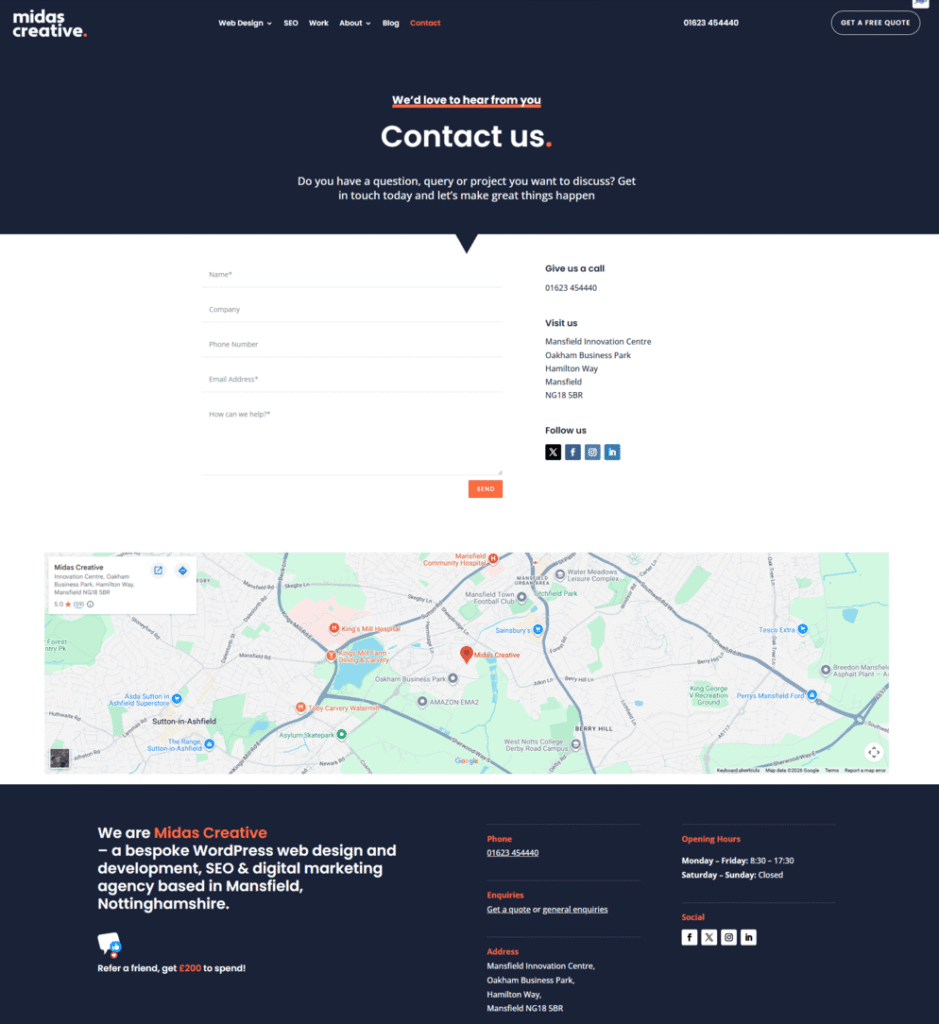
The above illustrates a clear, easy-to-use contact form.
Testimonials, reviews, and case studies: building real proof
Before they enquire, people want proof.
Testimonials and customer reviews help, but for many businesses, a strong case studies or portfolio page is even more valuable.
This is especially true for trades, design, property, healthcare, construction, and B2B service businesses.
Showing before-and-after visuals, project outcomes, or screenshots of work adds credibility that text alone cannot.
People do not just want to hear that you are good. They want to see evidence.
Legal pages: often overlooked but essential
Legal pages are not exciting, but they are important.
These generally include:
- Privacy Policy
- Terms and Conditions
- Cookie Policy
For UK businesses, these help support compliance, transparency, and trust. Their absence can make a site feel incomplete or unprofessional.
Supporting content pages: blogs and resources
Blogs, guides, and other useful content pages help your site do more than just describe your services. They help it attract traffic.
These pages allow you to:
- Answer real customer questions
- Target more search terms
- Build topical authority
- Support internal linking
Over time, these pages become a major source of visibility and organic growth.
How all the pages work together
A successful small business website is not just a random collection of pages.
Your homepage directs.
Your service pages convert.
Your content pages attract traffic.
Your contact page captures demand.
When they are linked properly, they work together as a system.
Paul, puts it simply:
“A good website isn’t just a set of random pages; it’s a structure. When everything connects properly, it works as a system rather than separate parts. There should be a natural flow between pages, allowing you to guide a customer to the outcome you want. For example, services pages should have ‘call to actions’ or buttons to take the visitor to an order or contact form. ”
Copywriting and Content: The Foundation of Effective Web Design
Why content should dictate design, not the other way around
One of the biggest mistakes small businesses make is focusing on the design first and worrying about the words later.
That nearly always causes problems.
You end up with a beautifully designed website that suffers from vague messaging, rushed explanations, and a lack of clarity about what the business actually does.
This is the Lorem Ipsum trap, designing around placeholder text and then trying to squeeze meaningful content into fixed boxes afterwards.
A better approach is the reverse:
- Understand the audience
- Define the messaging
- Structure the pages around what users need to know
- Then design around that
Damien, explains:
“A lot of websites look good on the surface but don’t actually say anything meaningful. If your content isn’t clear, the design can’t fix it. The message has to come first.”
A good example here would be a client that we worked with from Mansfield (not naming any names). She was focused solely on how the website looked, leaving the functionality, content and structure as an afterthought. We had to fight tooth and nail to try and get her to understand that design is super important, but the messaging, UX and UI are the building blocks to help with that design to shine.
Unconvinced, that design-led approach went ahead and six months later we had to rebuild the site again, focusing on the core principle or starting with content first.
Writing for the web: how people actually read websites
People do not read websites the way they read books. They scan.
Eye-tracking research has long shown users often follow an F-pattern, scanning headlines, short paragraphs, and key phrases rather than reading line by line.
That means your website copy should:
- Use short paragraphs
- Break information into sections
- Use clear headings
- Make key information easy to spot
A website is not the place for dense, over-written copy.
Clarity vs cleverness: why simple messaging wins
Many websites try too hard to sound impressive.
The clever version: “We provide cutting-edge residential water flow solutions.”
The clear version: “Emergency plumbers in Nottingham. We fix leaks fast.”
One sounds like marketing jargon. The other sounds like a business people can understand and trust.
Clear always wins.
The 5-second test for your website messaging
A simple test for your homepage messaging is this:
Look at it for five seconds and ask:
- What does this business do?
- Who is it for?
- What should I do next?
If the answer is unclear, the messaging needs work.
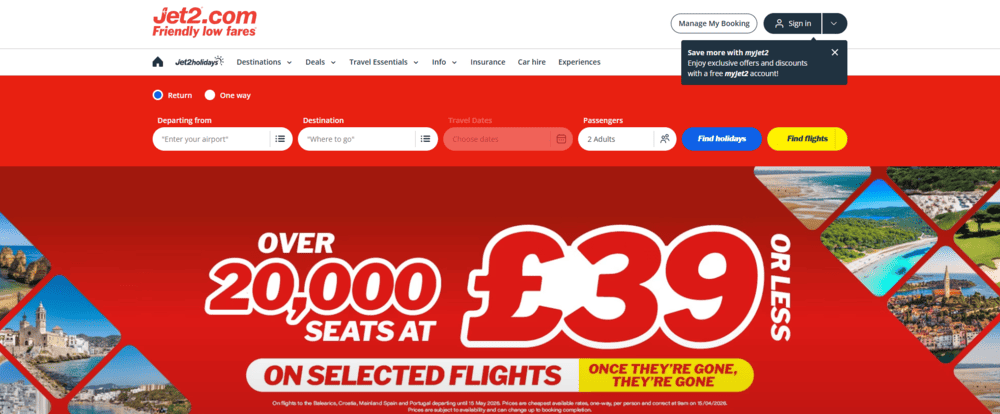
The example above from Jet2 is clear on what they are offering: a limited number of cheap flight seats. Within a few seconds, you clearly understand their message
How to write a high-converting homepage headline
Your homepage H1 matters more than most businesses realise.
A simple formula works well:
[What you do] + [Who you help / Where] + [Main benefit]
For example:
- Web Design for Small Businesses in Nottingham That Generates Enquiries
- Reliable Plumbing Services Across Mansfield With Fast Response Times
This instantly gives users context and confidence.
The “So What?” test: turning features into benefits
A lot of websites describe features and stop there.
For example: “We use state-of-the-art equipment.”
The better question is: So what?
The answer becomes the real copy: “We use state-of-the-art equipment, so your project is completed faster with less disruption.”
This is what benefit-driven copy does. It translates features into value.
Structuring content to support SEO and user experience
Good copy helps both users and search engines.
Clear headings, useful page structure, and sensible keyword use all help search engines understand your content and help users find the answers they need.
This is why content, SEO, and design should never be treated as separate disciplines.
The role of content in building trust and driving enquiries
Before a visitor enquires, they are usually asking themselves:
- Can this business help me?
- Have they done this before?
- Can I trust them?
Your content should answer those questions clearly.
That is where testimonials, case studies, service explanations, and real examples all matter.
How good copy turns your website into a sales tool
When content is done properly, your website stops being a passive brochure and starts working as part of your sales process.
It:
- Explains your value
- Handles objections
- Builds trust
- Guides people towards action
Paul explains:
“We can build something technically perfect, but if the messaging isn’t right, it won’t perform. The best websites are where design and content work together, not separately.”
How Does Website Design Affect Enquiries and Conversions?
Why good design alone is not enough
A website can look polished and still generate no enquiries.
That is because visual design alone does not create action. Strategy does.
A site needs to be designed around a clear commercial goal, usually generating phone calls, form submissions, or bookings.
Damien Buxton explains:
“We see a lot of websites that look fantastic but don’t generate a single enquiry. That’s because they’ve been designed visually, not strategically. A website should guide a user towards action, not just impress them.”
What actually helps convert visitors into enquiries
To turn visitors into leads, a website needs to reduce uncertainty and guide people clearly.
The main things that help are:
- Clear calls to action: Make it obvious what the next step is
- Strong trust signals: Reviews, testimonials, and proof reduce hesitation
- Clarity over cleverness: Straightforward messaging converts better
- Easy contact options: Phone, form, and email should be simple to access
A useful micro-copy tip here: avoid button labels like Submit or Send. They are generic and low-value. Buttons like Get Your Free Quote or Book a Consultation perform much better because they describe the benefit.
The Rule of One: keeping pages focused
One of the best frameworks for improving conversions is the Rule of One.
Each page should have:
- One main message
- One main goal
- One main CTA
If a page asks users to do five different things, they usually do none of them.
Common conversion blockers that stop enquiries
Some of the biggest conversion blockers include:
- Forms that are too long
- Weak or hidden CTAs
- Overwhelming content
- Poor mobile usability
- Lack of trust signals
On mobile, one particularly common issue is fat finger syndrome, where links or buttons are too close together and users tap the wrong thing.
A good mobile layout gives buttons enough breathing space and often keeps the main CTA visible with a sticky button.
Paul explains:
“Even small details like form design, button placement, and page speed can have a big impact on conversions. It’s often the combination of small improvements that leads to significantly better results.”
How to track and measure enquiries properly
You cannot improve what you do not measure.
Many businesses have no idea:
- How many enquiries the website generates
- Where those enquiries come from
- Which pages perform best
At a minimum, you should use:
- Google Analytics 4
- Google Search Console
- Form submission tracking
- Click-to-call tracking
If phone calls are a major lead source, dynamic call tracking tools can show exactly which source caused the phone to ring.
Turning your website into a 24/7 salesperson
When these things work together, your website becomes more than a brochure.
It attracts the right people, builds trust, answers key questions, and encourages action.
That is what turns it into a 24/7 salesperson for your business.
How Does Website Design Affect SEO and Search Visibility?
Why SEO is not something you “add later”
One of the biggest mistakes small businesses make is building a website first and thinking about SEO afterwards.
That usually creates problems.
Site structure, keyword targeting, internal linking, and page hierarchy should be considered from the start. If they are not, the website often needs reworking later.
Damien explains:
“SEO is not an add-on. It should be built into the structure of the website from day one. If it isn’t, you’re always playing catch-up.”
How search engines actually understand your website
Google does not see your website the way humans do. It relies on structure and signals.
A helpful way to think about this is a filing system. If your pages are organised clearly, with logical navigation and structured headings, search engines can understand them more easily.
If the structure is messy, visibility suffers.
URL structure: a simple fix that makes a big difference
Your URLs should clearly describe the page.
Bad URL: www.yoursite.co.uk/services/item-1234
Good URL: www.yoursite.co.uk/services/emergency-plumbing
Clear URLs help users and search engines understand the page topic immediately.
The role of page structure, headings, and internal linking
SEO starts with web page structure.
Each page should use:
- One H1
- Clear H2 sections
- H3s for supporting detail
Internal links also matter. Linking blogs to service pages and connecting related content helps distribute authority and improves crawlability.
Why page speed and mobile performance matter
Page speed is one of the most important technical SEO factors.
Slow websites lead to:
- Higher bounce rates
- Lower engagement
- Reduced visibility
One of the biggest causes of poor speed on small business websites is oversized, uncompressed imagery. Uploading a huge photo straight from a phone can damage load times badly.
Compressing images and naming them properly helps:
- example: nottingham-office-cleaning.jpg
- instead of: IMG_9384.jpg
Google also uses mobile-first indexing, so mobile performance is essential.
Local SEO: how design supports visibility in your area
For many small businesses, local visibility matters most.
Your website should clearly display your NAP details (name, address, and phone number) and these should match your Google Business Profile exactly.
Putting them in the footer and on the contact page helps reinforce local signals. Embedding a Google Map can help too.
Content, keywords, and search intent
SEO is not just about placing keywords into text.
It is about understanding what users want and creating content that matches that intent. If someone searches “small business website design cost UK,” they want real pricing guidance, clear explanations, and realistic expectations.
If your content does not provide that, it will struggle to rank.
How AI and modern search are changing SEO
Users now search with longer queries, conversational language, and AI tools.
This means your content needs to:
- Answer real questions clearly
- Use structured headings
- Provide useful depth
- Be easy for AI tools to interpret
That is one reason long-form, structured pillar content performs better than shallow, generic pages.
Why SEO and web design must work together
A good website should support SEO from the ground up.
That means:
- Flexible content management
- Clear structure
- Pages built around actual search intent
- Room for future growth
Platforms like WordPress are often better for this because they give businesses the ability to scale SEO over time.
The long-term value of SEO for small businesses
Unlike paid ads, SEO builds momentum.
A well-optimised site can:
- Attract consistent traffic
- Reduce ad dependency
- Bring in high-intent visitors over time
This is why SEO is one of the best long-term growth assets a small business can build.
Website Builder vs WordPress vs Bespoke: Which Is Right for Your Business?
Why choosing the right platform matters
The platform your site is built on affects:
- Performance
- Flexibility
- SEO
- Ownership
- Scalability
Choosing the wrong one can limit your growth later.
The biggest difference: renting vs owning your website
This is one of the most important distinctions to understand.
Using a website builder like Wix or Squarespace is like renting an office.
You pay to use the platform, but you are bound by its rules and restrictions. If you stop paying or want to move, you have limited control.
A WordPress website is more like owning the office. You own the site, you control where it is hosted, and you can adapt it as your business grows.
Damien explains:
“One of the biggest issues we see is businesses building on platforms they don’t control. It works at the start, but as soon as they want to grow or change direction, they hit limitations. This becomes a real challenge on larger or e-com websites with lots of pages. The monthly fee you started paying at the beginning was ok, but over time it has significantly increased year on year, now you have a website with hundreds if not thousands of pages that you want to move into a new system, tricky and potentially expensive.”
Website builders: when they work and where they fall short
Website builders are useful for:
- Very early-stage startups
- Sole traders testing an idea
- Simple brochure sites
They are convenient, but some have limitations:
- Restricted SEO
- Weaker flexibility
- Limited ownership
- Harder to scale
“Most people, they won’t have a clue which platform is best for their needs and the strengths and weaknesses of each. This is where a great website design company is worth its weight in gold. You’ve probably seen the TV adverts all proclaiming you can ‘build a website in a few hours’. We see it every week, clients approaching us, saying they tried to go it alone and then reached out as it was ‘very hard’ and ‘complicated’ to do. If you’re tech savvy, I’d say ‘give it a go’, we’ll be here when you need us.”
said Damien
WordPress websites: the most flexible option for growing businesses
WordPress powers a huge percentage of the web because it offers flexibility, scalability, and SEO control.
In fact, WordPress is used by 59.6% of all websites
Importantly, using WordPress does not mean using a generic theme.
Agencies can build fully bespoke websites on top of WordPress, combining custom design with platform flexibility.
Paul explains:
“With WordPress, you’re not limited by the platform. You can design and build something completely bespoke, while still having the flexibility to grow and adapt over time.”
Bespoke websites: when a fully custom build makes sense
A bespoke website is usually coded from scratch and is best suited to advanced requirements such as:
- Custom dashboards
- Portals
- Complex booking systems
- Bespoke integrations
For many small businesses, this is unnecessary at the start. For others, it is the right long-term investment.
Using WordPress will probably suit 99% of most businesses, it’s stable and can adapt to your needs and is easily updated when your needs change.
The biggest mistake: choosing based on price alone
The cheapest option is not always the most cost-effective.
Short-term savings often create:
- Long-term limitations
- Lost enquiries
- The need to rebuild later
A better question is: What does this website need to do for my business now and in the future?
Platform comparison: a simple breakdown
| Platform Type | Best For | Strengths | Limitations |
| Website Builder (Wix, Squarespace) | Startups, simple sites | Easy to use, quick setup | Limited SEO, restricted flexibility, you do not own the site |
| WordPress | Growing businesses | Flexible, scalable, strong SEO, full ownership | Requires proper setup, hosting, and maintenance |
| Bespoke Website | Advanced requirements | Fully custom, high performance | Higher cost, longer development time |
Which option is right for you?
- If you need something simple and quick → website builder
- If you want a flexible website that can grow → WordPress
- If you need advanced functionality → bespoke
The right answer depends on your business goals, not just your budget.
Again, talk with a good web company, tell them what you’re after and let them advise you. Information costs you nothing.
How Much Does Small Business Website Design Cost in the UK?
What actually affects the cost of a small business website?
There is no single standard website price because websites do very different jobs.
The cost depends on:
- How many pages you need
- How much customisation is involved
- Whether copywriting is included
- Whether SEO is built in
- What functionality is required
- How much strategy goes into the project
Damien Buxton explains:
“When someone asks how much a website costs, the real questions are what the website needs to do, how much input you want and your long term goals. A site designed to generate business will always cost more than one that just sits there, but it also delivers a completely different result.”
Typical website design cost ranges in the UK
| Solution Type | Typical UK Cost | Best For | Main Limitations |
| DIY Builder (Wix, Squarespace) | £10–£30/month | Very early-stage businesses | Weak SEO, limited flexibility |
| Freelancer | £500–£2,000 | Basic online presence | Limited strategy, inconsistent quality |
| Web Design Agency | £2,000–£10,000+ | Growth-focused businesses | Higher upfront investment |
| Bespoke Website | £10,000+ | Advanced functionality | Longer build time |
What you are actually paying for (and why it matters)
When you invest in a professionally built website, you are not just paying for visuals.
You are paying for:
- Strategy
- Messaging
- User experience
- Development
- SEO structure
- Testing
- Refinement
- Experience
A £3,000–£5,000 website might represent 40–80 hours of expert work across design, build, copy, and planning. A £500 website is usually a quickly modified template with minimal strategic input.
That difference is why two similar-looking websites can perform completely differently.
Why cheap websites often cost more in the long run
A cheap website that generates no business is not cheap.
If it needs rebuilding in a year, struggles to rank, and never brings in leads, it often costs more overall than a properly built site that performs from the start.
This is classic buy cheap, buy twice.
Ongoing costs you need to consider
This is where many business owners get caught out.
A website is not just an upfront purchase. It also has ongoing costs such as:
- Domain and hosting
- Maintenance and security
- Plugin updates
- Backups
- Content and SEO improvements
A site that is never maintained becomes outdated, underperforms, and becomes vulnerable.
How to budget properly for your website
A better question than “what is the cheapest option?” is:
What does my website need to achieve?
If your website is central to:
- Generating enquiries
- Supporting SEO
- Representing your business professionally
then it is worth budgeting for something built properly from the start.
What Common Website Mistakes Do Small Businesses Make?
Designing for themselves instead of their customers
One of the biggest mistakes is building around personal taste rather than user needs.
A classic example is the homepage image carousel. Business owners often want to show five messages at once, but almost nobody waits for slide two or three. One strong message and one clear CTA performs far better.
Trying to say too much and saying nothing clearly
Many websites try to cram everything into one page.
That usually results in clutter, confusion, and no clear message. Focused pages convert better than overloaded ones.
Ignoring SEO until after the website is built
A business will often launch a beautifully designed site, only to realise months later that it does not rank, does not bring in traffic, and does not generate enquiries.
At that point, fixing SEO becomes more difficult and expensive.
Weak or unclear calls to action
Users need clear direction.
Buttons like Submit or Learn More are weak. Stronger CTAs such as Get a Free Quote or Book a Consultation perform much better.
Poor mobile experience
Many sites still create a poor mobile experience through:
- Small text
- Awkward forms
- Poor spacing
- Buttons too close together
This includes fat finger syndrome, where users tap the wrong link because elements are crowded together.
Using generic stock imagery instead of real content
Cheesy stock photos reduce trust.
Authentic photos of your business, team, and work create much more credibility.
Neglecting website updates and maintenance
Outdated websites do not just look old — they become a security risk.
An out-of-date plugin is one of the most common ways a WordPress site gets hacked. If that happens, Google may flag the site as unsafe, which damages trust and rankings instantly.
Maintenance is not optional. It is protection.
Choosing the wrong platform or provider
The wrong foundation creates long-term problems.
Poor platform choice or a weak provider can lead to:
- Bad SEO
- Poor scalability
- Limited ownership
- The need to rebuild later
No clear strategy or goal behind the website
Many businesses launch a website just because they feel they need one, without defining what it should actually achieve.
Without a clear goal, even a good-looking site can underperform badly.
Thinking a website alone will generate business
A website without traffic will not produce results.
It needs:
- SEO
- Content
- Marketing
- Ongoing improvement
A website is part of a wider strategy, not the entire strategy.
Final Thoughts on Small Business Website Design
A well-designed small business website is no longer a nice extra. It is one of the most important business tools you have.
It shapes first impressions, builds trust, supports search visibility, and influences whether people decide to get in touch.
A successful website is not just about how it looks. It needs to communicate your message clearly, build trust immediately, rank well in search engines, and guide users directly towards taking action.
The difference between a site that simply exists and one that generates enquiries comes down to strategy, content, design, and SEO working together.
Damien Buxton puts it simply:
“A lot of businesses invest in a website thinking it will solve their problems overnight. In reality, the best results come from building something properly from the start and then improving it over time.”
A website should not be treated as a one-off project. It should be seen as an evolving asset that grows with your business.
If you get the foundations right, your website becomes easier to scale, your SEO becomes more effective, and your enquiries become more consistent.
If you get them wrong, you spend more time fixing issues, struggle to generate results, and eventually end up rebuilding.
For many small businesses, the challenge is not just building a website, it is building one that actually performs.
That is where working with the right team makes the difference.
Ready to build a website that actually generates enquiries?
If you’ve made it this far, you already understand what separates a good-looking website from one that delivers real results.
The next step is putting that into action.
If you’re ready to create or improve your website, you can:
- Explore our approach to web design
- Learn how our SEO services support long-term growth
- or get in touch to discuss your project and goals
There’s no pressure, just a straightforward conversation about what your business needs and how your website can support it.
FAQs About Small Business Website Design
u003cstrongu003eHow much does a small business website cost in the UK?u003c/strongu003e
A small business website in the UK typically costs between £500 and £10,000+, depending on how it is built. DIY builders are cheaper monthly options, while agency-built websites cost more upfront but are designed to generate enquiries and long-term results.
u003cstrongu003eHow long does it take to build a small business website?u003c/strongu003e
A typical small business website takes between 2 to 8 weeks to build. However, the timeline depends heavily on the size of the website, the complexity of the design, and how quickly the business owner can provide content and feedback.u003cbru003e
u003cstrongu003eIs WordPress better than Wix or Squarespace?u003c/strongu003e
For most growing small businesses, WordPress is usually the better long-term option because it offers more flexibility, better SEO capability, and full ownership of the site.u003cbru003e
u003cstrongu003eDo I really need SEO for my website?u003c/strongu003e
Yes. Without SEO, your website is far less likely to appear in search results, which means potential customers may never find it.u003cbru003e
u003cstrongu003eWhat pages should a small business website include?u003c/strongu003e
At a minimum, most small business websites should include a homepage, service pages, an about page, a contact page, and testimonials or case studies. These pages help users understand what you offer, build trust, and make it easier for people to enquire.u003cbru003e
u003cstrongu003eCan I build my own website, or should I hire a professional?u003c/strongu003e
You can build your own website if you are testing an idea or have a limited budget. If you want to generate enquiries, rank well, and grow your business, professional support usually produces far better results.u003cbru003e
u003cstrongu003eHow often should I update my website?u003c/strongu003e
Your website should be updated regularly with both technical maintenance and content improvements. This helps keep it secure, relevant, and visible in search results.u003cbru003e
u003cstrongu003eWhat makes a website generate enquiries?u003c/strongu003e
A website generates enquiries when it clearly explains what you do, builds trust, provides strong calls to action, works well on mobile, and attracts the right traffic through SEO or marketing.u003cbru003e
u003cstrongu003eDo I need a mobile-friendly website?u003c/strongu003e
Yes. Most users browse on mobile devices, and Google uses mobile-first indexing. If your site performs poorly on mobile, your rankings and enquiry rates will both suffer.u003cbru003e
u003cstrongu003eHow do I choose the right web design agency?u003c/strongu003e
Look for an agency that understands small businesses, has a strong portfolio, communicates clearly, understands SEO and conversions, and focuses on results, not just visuals.u003cbru003e



0 Comments